GitHub Actions Lockfiles Hit GA — But Most Workflows Stay Unprotected Until Teams Do the Work
GitHub Actions workflow lockfiles hit GA on October 28, 2026. Here's what security controls teams can enforce now and what still requires manual setup.
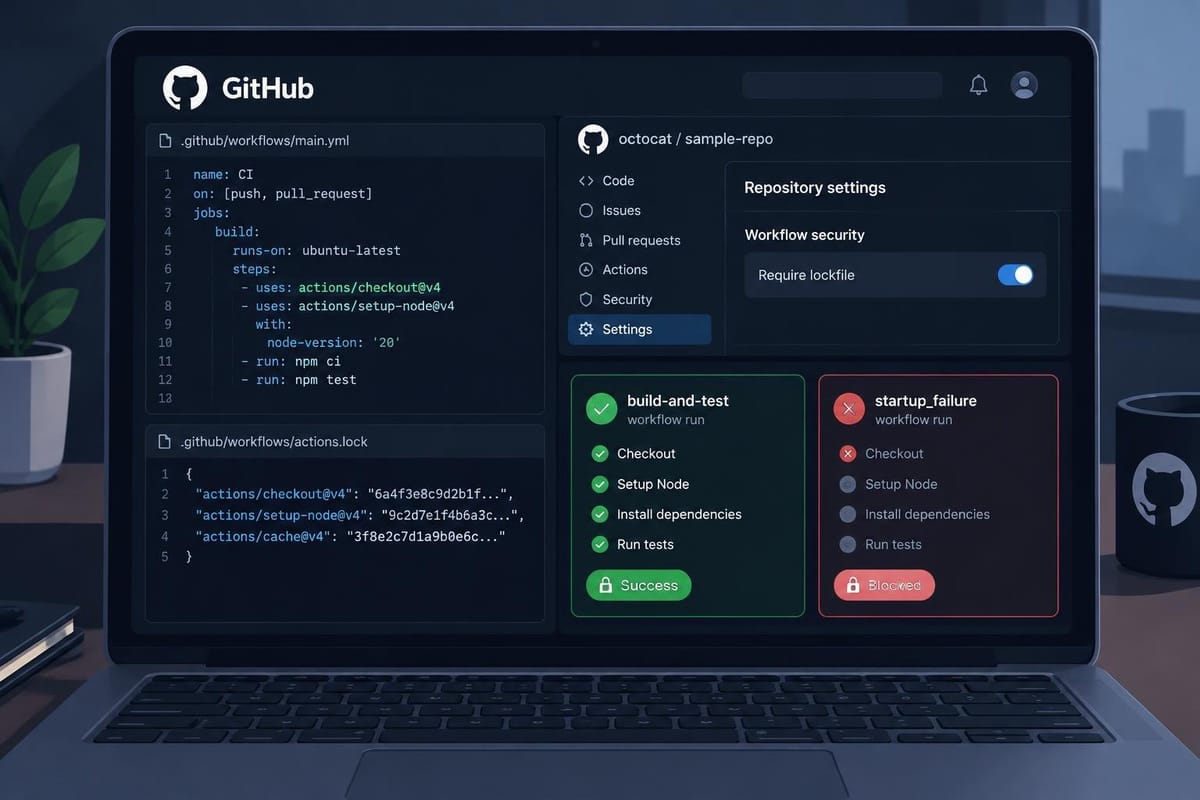
GitHub made workflow dependency lockfiles for Actions generally available on October 28, 2026. The feature had entered public preview on October 14. The actual security improvement only materializes if teams generate a lockfile, onboard every workflow they want covered, and explicitly enable an enforcement policy. Repositories that do none of that remain exactly as exposed as they were before.
The problem lockfiles solve
Every GitHub Actions workflow references actions by name and tag: actions/checkout@v4, actions/setup-node@v4, and so on. Tags are mutable. If the owner of an action repository force-pushes a tag — through a compromise or a mistake — the next workflow run picks up different code without any change to your .github/workflows/ YAML. The reviewed artifact and the executed artifact silently diverge.
This is not a theoretical risk. The tj-actions/changed-files supply-chain attack in March 2025 made it concrete: attackers pushed malicious code to a popular action's tag, and every workflow that referenced that tag by name ran the attacker's code on the next trigger. The traditional mitigation — pinning every uses: line to a full commit SHA — works, but SHA references are opaque in pull request diffs, and they go stale silently. They also leave transitive dependencies — actions that your action dependencies call internally — unpinned. As GitHub Docs explains, manually pinning to a SHA in the workflow file does not cover transitive dependencies from composite actions.
What the lockfile actually does
The lockfile, stored at .github/workflows/actions.lock, records a commit SHA for every action a workflow uses, including transitive dependencies that composite actions pull in. When a workflow is onboarded to lockfile enforcement, GitHub Actions validates that every dependency has a lockfile entry and executes the recorded SHA, not whatever the tag currently resolves to.
The ergonomic bargain is that you keep human-readable tag references in your YAML (uses: actions/checkout@v4) while the runner enforces the locked SHA underneath. Reviewers see the tag; the runner runs the hash.
The lockfile format, as documented in GitHub Docs, looks like this:
# This file is machine-generated by `gh actions-lock`.
# Do not edit by hand; run `gh actions-lock` to update.
# Docs: https://gh.io/actions-lockfile
version: 'v0.0.3'
workflows:
  '.github/workflows/ci.yml':
    - 'octo-org/[email protected]'
dependencies:
  'octo-org/[email protected]':
    ref: 'v3.1.0'
    commit: 'sha1-...'
    owner_id: 44036562
    repo_id: 197814629
Each entry records the tag or branch the commit resolved from, the exact commit SHA that will run, and numeric repository identity fields (owner_id, repo_id) that GitHub Actions uses at run time to confirm the repository behind the name is still the one you locked. GitHub Docs notes this structured format also gives Dependabot a machine-readable record for managing updates — without relying on YAML comments as version annotations.
One additional detail from the community discussion: GitHub considers an action "pinned" if it uses a full commit SHA directly or if it is covered by a lockfile entry. GitHub Docs confirms that for onboarded workflows, the lockfile satisfies the separate "Require actions to be pinned to a full-length commit SHA" policy — the two approaches are treated as equivalent.
How to generate and maintain a lockfile
Lockfiles are not generated automatically. A maintainer must install the gh actions-lock CLI extension and run it explicitly:
# Install the extensiongithub/gh-actions-lock
gh extension install # Onboard a specific workflow and generate/update the lockfile.github/workflows/ci.yml
gh actions-lock lock --workflow # Or lock all workflows in the repositorylock
gh actions-lock # Check whether the existing lockfile is current without modifying filesverify
gh actions-lock
The verify subcommand is designed to run as a CI check: it exits non-zero if the lockfile is stale. The GA changelog describes this as: "Check for stale lockfiles: Verify that your lockfile is up to date without modifying files, including in a CI check."
One practical finding from hands-on testing by Yuji Nishimura at DevelopersIO (checked November 2, 2026): a workflow pushed with a stale lockfile becomes startup_failure and does not show up in the PR's checks at all — meaning the lockfile verify step in CI is what surfaces the problem as a visible check. Without --verify in CI, a stale lockfile will silently block the workflow run rather than failing a reviewable check.
Nishimura also flagged a versioning pitfall: the official sample CI pins gh actions-lock with --pin v0.2.0, but the latest at time of testing was v0.4.0. The --verify behavior changed in v0.3.0, with the release notes stating "Some lockfiles that passed --verify on v0.2.0 now fail it." Teams using the older sample should update the pinned version.
For ongoing updates, when Dependabot opens a version-update pull request for an action in a workflow that is already onboarded, it also regenerates the matching lockfile entry in the same PR — the GA changelog states this works "without additional configuration." The workflow reference and its locked commit arrive together in a single reviewable diff. Note that Dependabot does not onboard new workflows; that step requires running gh actions-lock manually.
What the "Require lockfile" policy enforces — and what it doesn't
Enterprise, organization, and repository administrators can enable a Require lockfile policy. Per the GA changelog: "Enterprise, organization, and repository administrators can use the Require lockfile policy to enforce adoption."
When active, any workflow in scope must be onboarded with a valid, up-to-date lockfile entry — or execution is blocked with a startup_failure. The policy applies even to workflows that have no uses: dependencies at all, as Nishimura's testing confirmed: a workflow with only a run: step and no action references also became startup_failure when not onboarded under an active Require lockfile policy.
However, there is an important plan-based limitation. Nishimura's testing found that Require lockfile is not enforced in Free plan private repositories. It is enforced in public repositories and in private repositories on GitHub Team or GitHub Enterprise. The on-screen policy creation notice during testing still carried a "Preview" label even after the October 28 GA announcement.
The policy also does not automatically onboard workflows. A workflow that has never been onboarded is blocked when the policy is active — but the solution is to run gh actions-lock and commit the result, not to assume the policy generates the lockfile.
For teams running Free private repositories that cannot use Require lockfile, Nishimura's recommended alternative is enabling SHA pinning enforcement instead, combined with --verify in CI. Workflows that use full SHA references in their YAML run even when not onboarded to a lockfile.
What GitHub Docs says the lockfile does not do
GitHub is explicit about the boundary of the protection:
Lockfiles help protect against unexpected dependency changes, but they don't determine whether a dependency is safe. Review dependencies before locking them.
A lockfile pins the SHA that was current when you ran gh actions-lock. If an action was already compromised before you locked it, locking records the malicious commit. As InfoQ's Claudio Masolo noted, teams that auto-merge Dependabot's lockfile update PRs effectively carry any malicious change straight into the lockfile — the review that happens at the Dependabot PR is the actual security control.
GitHub Docs also specifies that the lockfile covers transitive action dependencies but does not cover calls to reusable workflows (jobs.<job_id>.uses). Reusable workflows can have their own lockfiles; their dependencies are covered by the lockfile of the repository where the reusable workflow is defined, not by the caller's lockfile.
A live rough edge: local composite actions
A contributor in the community discussion reported that GitHub Copilot setup workflows and Code scanning AI findings fail when a local composite action uses the $/ or ./ syntax:
Error: Unable to resolve self-reference '$/'. This can occur when the server does not support this syntax, the feature flag is disabled, or the workflow context (repository/SHA) is unavailable.
The only known workaround at the time of writing is to inline the composite action's steps directly into the calling workflow.
The before/after in one table
| Scenario | Protected? |
|---|---|
| Workflow onboarded, lockfile current | ✅ Recorded SHA executes; tag movement blocked |
| Workflow onboarded, lockfile stale | ❌ Run becomes startup_failure; --verify CI check fails |
| Workflow not onboarded, Require lockfile policy active | ❌ Blocked with startup_failure until onboarded |
| Workflow not onboarded, no Require lockfile policy | ❌ Mutable tag runs whatever it currently resolves to |
| Free plan private repo with Require lockfile policy enabled | ❌ Policy not enforced; use SHA pinning enforcement instead |
| Workflow uses full SHA pins directly in YAML (no lockfile) | ✅ Protected from tag movement; satisfies SHA pinning policy |
| Dependency was already compromised before locking | ❌ Lockfile records the malicious commit; identity is pinned, safety is not |
Reusable workflow call (jobs.<job_id>.uses) |
❌ Not covered by calling repo's lockfile |
The improvement from GA is real and meaningful for teams that do the work: generate the lockfile, commit it, onboard every workflow, add --verify to CI, and enable the enforcement policy at the appropriate scope. The catch is that none of this is automatic. Teams that skip any step remain exposed to the same tag-mutation attack surface that existed before October 28.
The feature is available on GitHub Enterprise Cloud, GitHub Enterprise Cloud with data residency, Team, and Free plans.
Comments ()